I’ve been silent on this blog for a while. I’ve been reducing my time on the internet to “touch grass” more as the young-uns put it. I guess I’ll return to more active contributions on open source software and writing on this blog when the LLM hype thing dies down a little more.
This post is more of a overflow piece. I was about to reply to Christine Lee’s post on Bsky but as usual I am too verbose, so I’ve transmigrated the content here, and expanded upon it.
Without further ado, here’s how I write. This article will mainly be focused on fiction, since Christine is a fiction author. I have a separate workflow for academic papers and slides, but the same principles apply.
Tools
The main tool I use in writing is emacs. Why emacs? Org-mode.
Note: If you are new to emacs, my advice is to just read through the built-in tutorial, and then start writing. Don’t fall into the trap of customizing emacs. I’ve been using emacs for decades now and still I am finding new things about it.
Orgmode
Orgmode is the “killer app” for emacs. With orgmode you write in plaintext, with minimal markup to instruct the editor to manipulate. Orgmode also supports many forms of exports (epub, html, pdf, odt, etc), which is good enough for authors. Further exports are handled by the almighty pandoc.
Best of all, orgmode comes in most default installations of emcas.
Nowadays there are many guides out there on how to use orgmode. Most of them are for organizing your life with orgmode*At one point I got quite neurotic with orgmode, during the Getting Things Done craze about 20 years ago. Never again!. In my opinion, for a total newbie in writing with emacs and orgmode, is overkill.
What you need is simply a good directory structure, and a simple starter template. Here’s a minimal template:
#+TITLE: TITLE HERE
#+AUTHOR: YOUR AUTHOR NAME
#+EMAIL: YOUR EMAIL
#+OPTIONS: title:t
#+OPTIONS: date:nil
#+OPTIONS: toc:nil
#+OPTIONS: ':t

* Chapter 1
YOUR STORY GOES HERE
Mine is a little more complex, which I will explain in the later sections.
In my experience, every short story I write is different, and will end up with different requirements (an example will be shown in the sections below). This is where orgmode shines. Your process modifies the tools you use. You don’t have to change your process to fit the tools. No reverse-unicorns here!
Org-Novelist For Novels
Plain orgmode is powerful enough. But sometimes, you want to write a longer piece. And that would have complicated requirements. This is where org-novelist comes into play.
I have written 1.5 novels with org-novelist — one at 80,000 words and the other WIP at 69,000 words. I’m quite satisfied with it.
What org-novelist is is a set of templates, a prescribed directory structure, and a bunch of scripts that processes the text in the directories into the story. As a part of that, org-novelist keeps tracks of characters, places, props, and chapter notes. You DO have to give up some flexibility but I found that for larger texts, it’s well worth it.
Git
I use git for version controlling. This has been quite useful for me in the past. As I will explain in the sections below, I use the git hash as a watermark, so I know which versions I’ve been sharing.
Another feature is git tagging. Whenever I feel like I finish a draft, I create a git tag. This allows me to identify versions that I think are “complete”.
I also can search for older deleted content with git. When two beta readers read my novel and noticed a similarity with Stephen Wolfram’s physics project, I decided to restore a couple of references to Wolfram. A simple git grep Wolfram $(git rev-list --all) was able to tell me which commits had them, and I simply cherry picked the paragraphs out.
How I Write Short Stories
As mentioned, I use plain orgmode to write my shorts. I find that plain orgmode is useful for stories that range from 2,000 to 30,000 words with a smaller cast and events to keep track of. In this section I’ll show some examples of how the tools change according to the process.
Here’s my directory structure of my short fiction works:
└── shortfic
    ├── aggregate-failure
    │   ├── aggregate-failure.docx
    │   ├── aggregate-failure.odt
    │   ├── aggregate-failure.org
    │   ├── aggregate-failure.pdf
    │   ├── aggregate-failure.tex
    │   └── submissions_tracking.org
    ├── ... some stories here ...
    ├── checklist.org
    ├── erotica
    │   └── censored, you perv!
    ├── githash.org
    ├── lethal-linguistic-misinterpretations
    │   ├── large-linguistic-misinterpretations-longform.org
    │   ├── large-linguistic-misinterpretations.org
    │   ├── submissions_tracking.org
    │   └── yura
    │       └── main.go
    ├── ... some other stories here ...
    ├── out-of-bits
    │   ├── out-of-bits.org
    │   ├── scripts.el
    │   ├── submissions-tracking.org
    │   ├── tsubitsu_logo_transparent.png
    │   └── tsubitsu_logo.png
    ├── shared.org
    ├── ... some other stories here ...
    └── what-is-it-like-to-be
        ├── blog.org
        ├── src
        │   ├── analysis.go
        │   ├── go.mod
        │   ├── main_test.go
        │   ├── main.go
        │   ├── parser_test.go
        │   ├── parser.go
	├── story.org
        └── story.tex
First, observe that all my shorts are in their own directories. This process came organically. Originally I had all my short sitting in their own files. But as soon as I started writing the third short, I realized I had to organize them into their own folders.
Aside from the subdirectories for the stories, there are a few extra files, like shared.org or githash.org. In a later section I’ll go through them, but for now I’ll show how a basic short story is written.
A Basic Short Story
But first let’s look at the first short story in the list above:
    ├── aggregate-failure
    │   ├── aggregate-failure.docx
    │   ├── aggregate-failure.odt
    │   ├── aggregate-failure.org
    │   ├── aggregate-failure.pdf
    │   ├── aggregate-failure.tex
    │   └── submissions_tracking.org
Here we see a file aggregate-failure.org. This file contains the story. aggregate-failure.docx, aggregate-failure.odt, aggregate-failure.pdf and aggregate-failure.tex are export artifacts. I exported the story in various formats for publication. Lastly, there is submissions-tracking.org. I’ll talk about this in a later section.
Aggregate Failure as it turns out is a pretty run-of-the-mill story. This is the structure of the document:
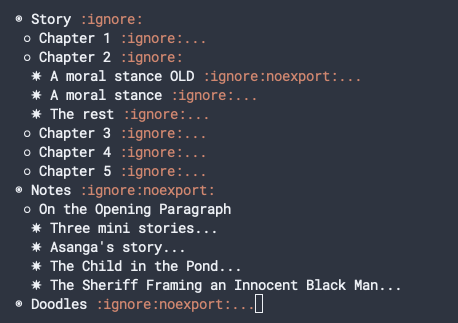
The way I structure my document is that I have three parts: Story, Notes and Doodles. I don’t always structure my document thus. The structure of the document is made up in a very ad hoc fashion. I usually start with only a Story part. Then as needed, I add chapter or scene headings. When I need to add notes, I add a Notes in a separate (usually) top-level section at the end. Sometimes, I have an Author Notes section, which I intend to turn into blog posts. Sometimes these Author Notes turn into such monsters that I spin them off into a separate document, like for the short story in the folder what-is-it-like-to-be*That story is roughly 3000 words long. But the blog post detailing the construction of the story currently sits at 7,000 words..
Controlling What Is Exported
The main reason why I am quite comfortable with stuffing everything into one document is the amount of control orgmode gives me when it comes to exporting things.
The :ignore: tag at the end of the heading controls whether the chapter heading is exported. The :noexport: tag indicates whether the entire text under the heading should be exported or not.
Editing Affordances
Further, emacs and orgmode comes with a bunch of utility functions that allow a lot of editing affordances. Using M-x org-tree-to-indirect-buffer I can open particular sections and focus on them individually. For example, I could open the “A Moral Stance OLD” and “A Moral Stance” sections side-by-side and compare the old version with the new version. This is clearly very useful for editing.
Splitting Into Files
This pertains more to longer form fiction. But sometimes, a chapter may have so many scenes that it’s unweidly to actually keep them in the same file. Sure you could use indirect buffers to split them for focus, but sometimes it’s just better to split them into separate files.
An additional benefit would be that I could just export one scene for review.
I do this by using the built-in #+INCLUDE directive.
So for example, if I am in a story that spans multiple years, I’d split the scenes something like this:
** Fifteen Years Later :ignore:
#+INCLUDE: "./fifteen-years-later.org::*MY HEADING NAME" :only-contents t
And in the file fifteen-years-later.org I’d have multiple headings, and the #+INCLUDE directive would only pull the desired heading, and only contents. In this way I am able to work on the fifteen-years-later.org file, exporting it, have notes in it etc., separately; and yet come together when I want to export the full story.
A Slightly More Advanced Short
Most of the fiction I write fall under the umbrella of hard science fiction: a reader once complained that if they didn’t already have a PhD in topology, they wouldn’t be able to understand what was going on (this is a sign that my writing is quite bad btw).
But I quite enjoy the rigours of writing hard science fiction. To realize a lot of my choices, I often write programs to simulate elements of the story. I situate the programs I write to validate the elements of the story in the same directory as the stories themselves.
In the story Shibboleth of Villainy (in the directory lethal-linguistic-mistinterpretations above), the story lays out enough clues for an enterprising reader to reconstruct a program that would translate the alien language in text. And now, for a bit of an embarrassing fact: the program (main.go) that’s currently in the yura directory was reconstructed by me reading the story. I had originally written the program on a different computer, at a different location, and I couldn’t for my life remember where it was. So I recreated the program by reading the story.
From then on, I co-situate the source code for any fiction I write.
Tracking Submissions
I only started writing fiction seriously in 2024. I’m still not very good at it. But one thing I wanted to try is to get at least one of my short stories published by someone else. So I have a file, submissions-tracking.org in each story. The template for the file is as follows:
#+TITLE: Submissions Tracking
#+TODO: TODO SUBMITTED REVIEW REVISE RESUBMITTED | ACCEPTED REJECTED WITHDRAWN DONE NOTELIGIBLE

* Cover Letter
        ... COVER LETTER TEMPLATE HERE...
* Bio
        ... BIO TEMPLATE HERE...

* TODO Clarkesworld
:PROPERTIES:
:Guidelines: http://clarkesworldmagazine.com/submissions/
:Date:     [DATE]
:LastResponseDate: [DATE]
:Tracking: [TRACKING NUMBER]
:TrackingURL: https://clarkesworldmagazine.com/submissions_tracker/view.php
:END:

* TODO Asimov's Science Fiction
:PROPERTIES:
:Date:     [DATE]
:LastResponseDate: [DATE]
:Tracking: [TRACKING NUMBER]
:TrackingURL: [URL]
:Guidelines: https://www.asimovs.com/contact-us/writers-guidelines/
:END:

...and so on and so forth...
You will note the TODO in front of each section. This document takes advantage of orgmode’s TODO tracking. At the very top, I list the available statuses. So when I send a story off to a publisher, I simply press S-RIGHT to change the status of a submission.
As I send the story off, I write my submission statement(s) in the relevant sections. I copy the template, and modify to suit.
When I hear back from publishers, I update the properties in each section.
How I Write Short Stories (Advanced Mode)
And now, for something more advanced.
This is the directory structure for the short story “there is no constant non-zero derivative in nature” (its original title was “Out of Bits”:
    ├── out-of-bits
    │   ├── out-of-bits.org
    │   ├── scripts.el
    │   ├── submissions-tracking.org
    │   ├── tsubitsu_logo_transparent.png
    │   └── tsubitsu_logo.png
Observe that there is a scripts.el in it.
And this is the rather scary looking structure:
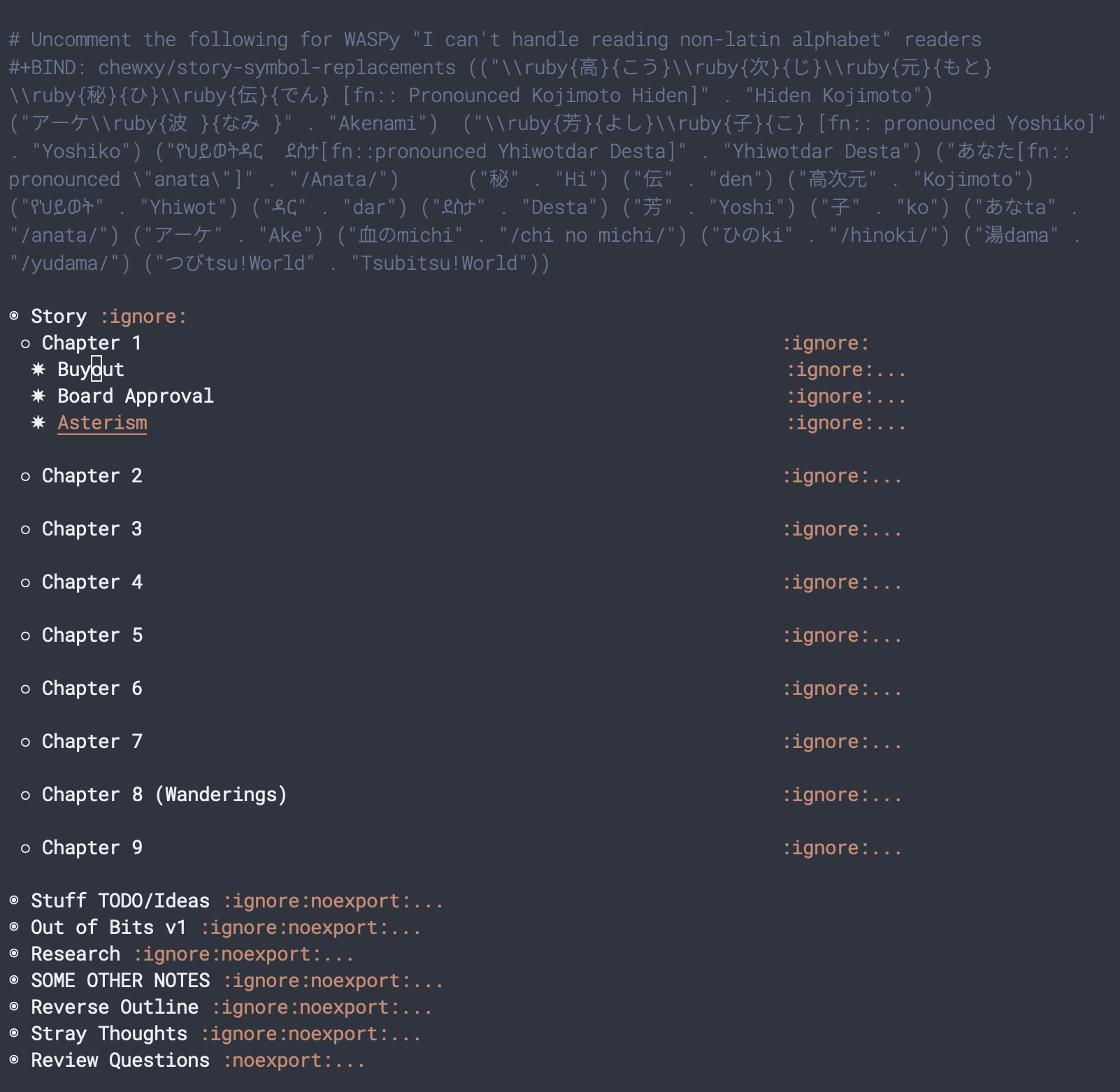
There are more parts compared to the previous short. This story is one that I worked quite a bit on more with writing groups, critique circles and all that. It also ran through several rewrites. As a result there are more sections.
But what is interesting is the impact of the reviews and how the reviews shaped my workflow with this document. The first thing I do is to capture all the review questions in the last section.
Property Drawers for Statistics and Editing
The first versions of the story took place in an office setting. This was one of the chief complaints for the beta readers. So my solution was to go through the entire story, and annotate each scene with where it was taking place. I did this by using orgmode’s properties drawer.
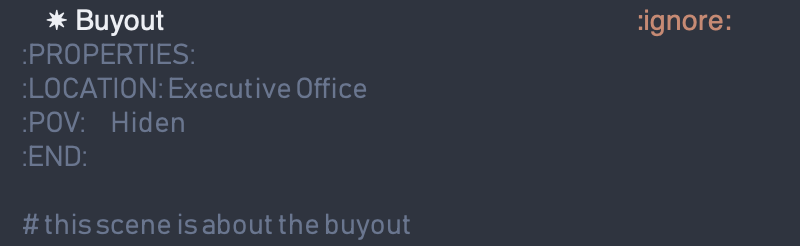
Orgmode’s property drawer allows you to put custom properties attached to each header. Since I already added headers to each scene (for easier editing), it was easy to just add them. Then I wrote a function to compute the statistics, which I put in my ~/.emacs.d/:
(defun chewxy/org-get-property-stats (prop)
  "While `org-entry-properties` is useful, it returns a unique set of values for the property. When instead we want a count, we use this function.
The results are displayed in a new buffer named *Org Property Stats*."
  (interactive "sProperty: \n")
  ;; check that the property is found in the property keys
  (unless (member prop (org-buffer-property-keys))
      (error (format "%s not found in property drawers" prop)))
  (let ((stats-table (make-hash-table :test 'equal))
	(original-buffer-name (current-buffer)))
    (save-excursion
      (org-element-map (org-element-parse-buffer) 'headline
        (lambda (headline)
	  (message "HEADLINE" headline)
          ;; For each headline, get its associated properties.
	  (let* ((values  (org-entry-get headline prop)))
	    (message (format "values %S" values))
	    (when values
	      (dolist (value (split-string values ","))
		(let ((trim (string-trim value)))
		  (unless (string-empty-p trim)
		    (let* ((curcount (gethash trim stats-table 0)))
		      (puthash trim (1+ curcount) stats-table)))))))

    ;; Display the results.
    (let ((results-buffer (get-buffer-create "*Org Property Stats*")))
      (with-current-buffer results-buffer
        (erase-buffer) ; Clear any previous results
        (insert (format "%s Statistics for: %s\n\n" prop original-buffer-name))
        ;; Iterate through the hash table and insert each key-value pair.
        (maphash (lambda (location count)
                   (insert (format "%-30s: %d\n" location count)))
                           stats-table))
      ;; Show the results buffer to the user.
      (pop-to-buffer results-buffer)))))))
A quick M-x chewxy/org-get-property-stats later, you’d get a list of statistics:
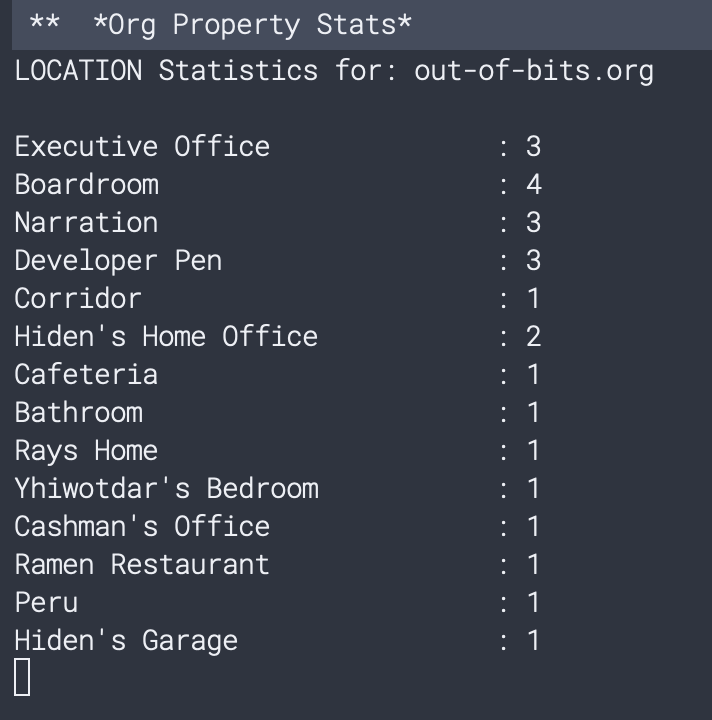
This turned out to be quite useful when another reviewer mentioned that the POVs are a bit unbalanced. Again, this was trivially annotated with properties and statistics could be computed.
One cool benefit of this is that the statistics highlighted a problem with my POV voices. Even though the POV distribution was fairly even across the story, two of the characters had a very similar voice, so when reading it did feel like it was one character.
Once more, the property drawer attached to the heading was useful. Because I added a header for each scene, I would have an almost constant reminder whose POV I’d be writing from.
Different Versions — 1
Sometimes, I play with form in my shorts. In “there is no constant non-zero derivative in nature”, there is an element of such playing with form (and the fluidity of POVs). To show you what I meant, this is what I wrote in the plaintext:
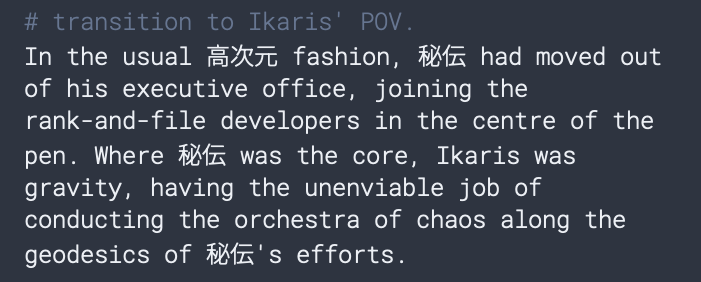
The character names were written in Kanji and Amharic respectively. Sometimes some phrases would be rendered in Japanese — e.g. 血の道 (chi no michi), which is a very Japanese accepting way of accepting menopausal changes. Obviously as you can imagine, this caused some readers to complain.
Enter the scripts.el file and the scary looking BIND directive at the top of the file. I simply wrote a bunch of code to do symbol replacement when exporting the story. This way I could export a version that is entirely in latin alphabet and another version that is more true to the form I was envisioning.
I could get:
 or:
or:  all with a single toggle.
Different Versions — 2
Sometimes I want to A/B test my prose. And I can get quite neurotic, sometimes down to the sentence level. Take for instance, the first paragraph for an early chapter for my WIP novel, Mode Collapse.
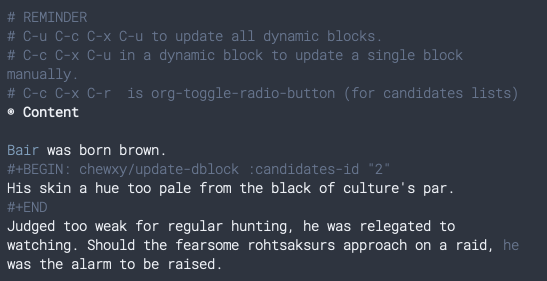
Here I use orgmode’s dynamic blocks to dynamically change the content in the block of text that is wrapped with #+BEGIN and #END. For this screenshot, I had temporarily deleted the other sentences’ block wrapping. But every sentence in the paragraph has at least one other alternative.
The choices are stored a separate heading, at the bottom of the document:
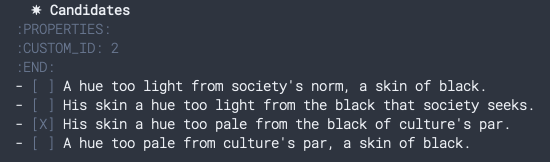
This way I can select a sentence at the bottom, update the dynamic blocks with the keyboard shortcuts (I wrote those reminder comments there for myself).
This is done through the function chewxy/update-dblock which updates a dynamic block based on the content of an options list. In the screenshot above, the list specified has ID 2. I tend to label my alternatives based on the sentence number.
If you wonder “but how do you get your sentence number?”, and guessed “oh he probably wrote some code to find it”, then you have begun to appreciate the power of writing with emacs.
Watermarking
This is more a LaTeX specific workflow though, so please skip through if you don’t intend to use LaTeX.
When I export my stories to share with people, they are often in an incomplete state. It’s important for me to know which version of the story I’m sharing. And a solution is to simply watermark the PDF. Since I export my stories with LaTeX, I simply rely on a very good LaTeX package, draftwatermark.
This is what the front page of my exports look like:
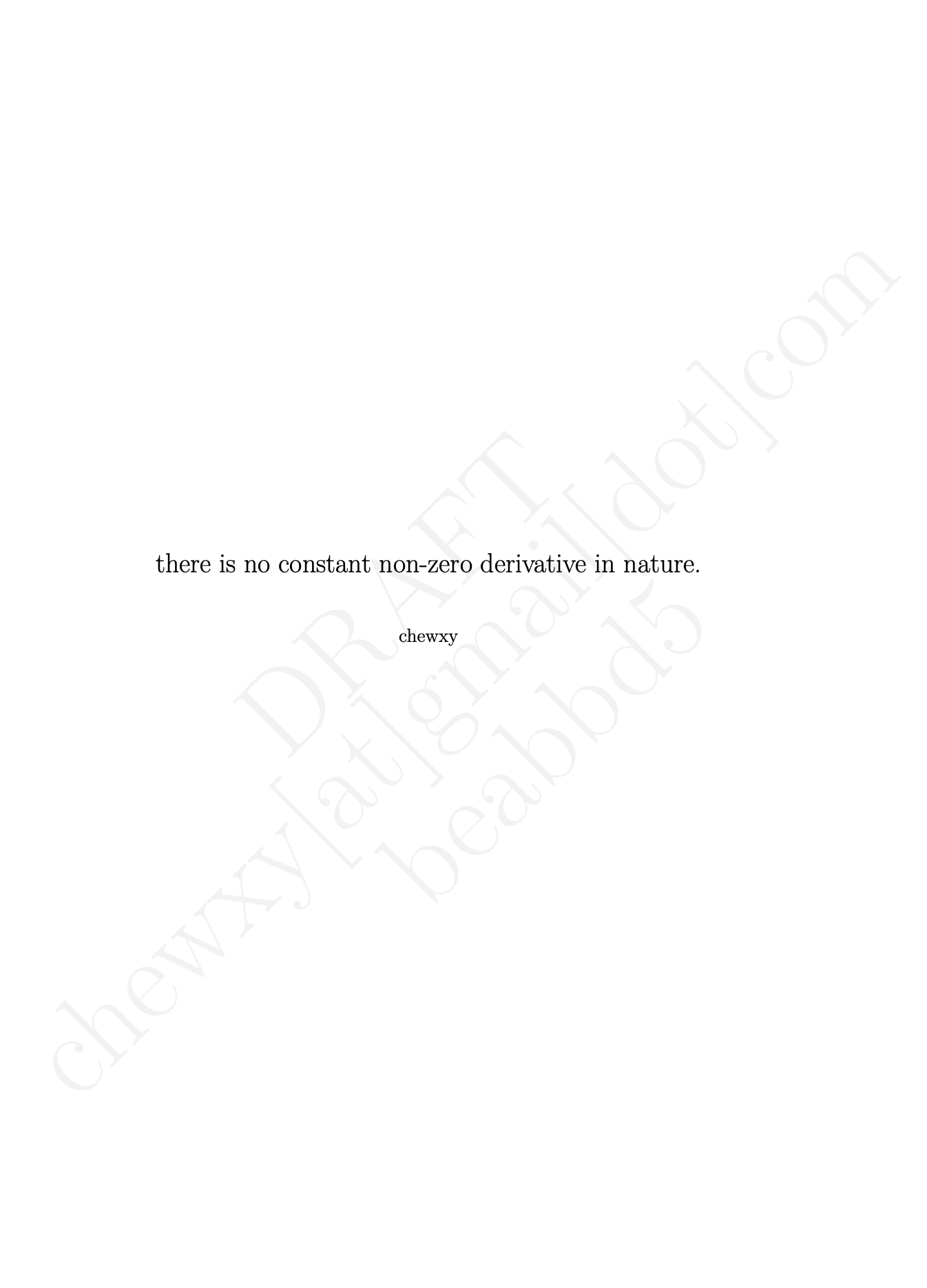
Here I mark a draft with a huge “DRAFT”, my email address, and a strange string of alphabets and numbers. That string is the git hash, identifying the commit in which I exported the file.
How? With the magic of orgmode setupfiles. Here’s a more complete version of my starter template:
# -*- ispell-local-dictionary: "australian"; -*-
#+SETUPFILE: ../githash.org

#+TITLE: TITLE
#+AUTHOR: AUTHOR NAME
#+EMAIL: EMAIL
#+OPTIONS: title:t
#+OPTIONS: date:nil
#+OPTIONS: toc:nil
#+OPTIONS: ':t

# when not draft anymore, uncomment below
# +LATEX_HEADER: \SetWatermarkText{}
The first line defines what dictionary I use (some stories, set in an American context, will use an American dictionary, otherwise it defaults to Australian).
The second line defines what the setupfile to use. In this case, it says to use the githash.org file. But the key is in the last line of the file:
#+SETUPFILE: shared.org
#+LATEX_HEADER: \SetWatermarkText{\shortstack{DRAFT\\43c5f14 }}
What I have done is to add a git post-commit hook to replace the git hash in the last line with the latest git hash. Because of this, the githash.org file is never actually tracked by git, since modifying the file would then modify the git hash. And so all the complex LaTeX header stuff that I want common across all my stories are stored in shared.org, which explains why githash.org has its own setupfile.
When I am really satisfied, I then uncomment the line in the story:
#+LATEX_HEADER: \SetWatermarkText{}
Unfortunately these works will always be in progress until they get published, so the only time I see my PDFs without the watermark is when I was testing the process.
Conclusion
And there it is. A brief overview of how I write using emacs and orgmode. I focus a lot on short stories in this post because that’s my latest obsession. But the same things would translate to novel writing.
I use emacs because I am in control. Where other writing software demands you follow their workflow, here, I let the workflow grow organically. With a bit of code, I can often get a LOT done.
Further Reading
Here’s another interesting workflow I found: The code and open-source tools I used to produce a science fiction anthology
Appendix
Because I’m being self-indulgent, the following is a brief listing of my short stories that I’m actively working on and their descriptions:
| Title | Status | Description | Notes |
|---|---|---|---|
| Aggregate Failure | WIP | A short story about the main character adjusting their moral viewpoints following the discovery of a logical flaw (the aggregate failure) in their initial morality. | Paused because I’m not sure what point I’m making. The story is pretty waffly. Also I seem to fancy myself more of a moral philosopher than anything. |
| Catamorphism Along A Fractal of Sin to an Infernal Basis; or: Highway to Hell | WIP | Dante’s inferno with mathematics and capitalism. Karl Marx makes an appearance. | Started because I finished R.F Kuang’s Katabasis and thought I should write a more mathematical katabasis story. Paused because I’m not as good a writer as I expect myself to be. |
| Shibboleth of Villainy / Lethal Linguistic Misinterpretations | Finished | A software developer uses large language models to help with a first contact effort. Shennanigans happen. | I wrote two version of this: one as a traditional story (Shibboleth of Villainy), and one as a long-form article you’d see in the Atlantic or something (Lethal Linguistic Misinterpretations). |
| The Case of the Liquidated Corps | Finished | A murder mystery. Corporations are people, and people can be murdered. Who murdered the trillion-dollar company Infinite Variables? SEC special consultant Agatha Chambers is on the case. | This one was probably the most fun. I adapted this from my backlog of story ideas when Musk bought Twitter. |
| there is no constant non-zero derivative in nature | Finished | Hiden Kojimoto, a game developer, discovers that the world is running out of a particular resource, mirroring the situation set up in his game. But is it just his game? Or is it reflective of the real world? | This one took quite long to write. |
| A Prompt, Summary Execution | Finished | Emma Moore Santee is the top statistician in the world. And she embarks on her latest quest: to summarize the world’s knowledge with her partner Travis. | |
| The Invention of Writing | To rewrite | People invented religion when writing was invented. Books were considered holy relics because writing was a new technology. But what malevolent entity drives the invention of writing? | Set in the same universe as Mode Collapse. In the intervening 50,000 year time jump |
| What Is It Like To Be | WIP, editing | An experimental piece about the most absurd, most alien POVs possible. |
Of course, most of these have been rejected by publishers. So, yeah, my writing ain’t great.